


In this digital era, data is invaluable. It drives decisions, powers applications, and if fallen into the wrong hands, can lead to significant losses. Microsoft Azure offers a plethora of services for data storage, such as Azure SQL Database, Azure Cosmos DB, Azure Files, Azure Blob Storage and others. In this blog, we will focus on securing Azure Blob Storage, exploring the available options to allow restricted access to your account and enhance security.
Securing your data starts with controlling who can access it. Azure provides several mechanisms to manage access effectively:
Authorization
Proper authentication ensures that only authorized personnel can access your data.
1) Role-Based Access Control (RBAC)
RBAC allows you to assign predefined roles with specific permissions to users, groups, and applications, ensuring they have only the access they need.
- Principle of Least Privilege: One of the best practices for Azure role-based access control
(RBAC) is to grant users the least privilege to get their work done. This means that you should only assign
the
roles and permissions that are required for users to perform their specific tasks. By doing so, you can
reduce
the risk of unauthorized actions or security breaches.
In terms of Blob Storage, you can assign users roles such as Storage Blob Data Owner, Storage Blob Data Contributor, Storage Blob Data Reader and Storage Blob Delegator.
It's advisable to steer clear of roles like Owner and Contributor for BLOB data access because they are high-privilege roles that grant access to storage keys. Storage access keys hold extensive permissions, akin to a root password in a Linux system, allowing full control over the storage account.

- Use Managed Identity: Azure Managed Identity is a feature that enables secure and
passwordless
authentication between Azure services and resources. It allows you to access Azure Storage and other
services
that support Azure AD authentication without having to manage any credentials in your code or configuration
files.
Azure Managed Identity has two types: system-assigned and user-assigned. A system-assigned managed identity is tied to the lifecycle of a specific Azure resource, such as a virtual machine or a function app. A user-assigned managed identity is a standalone resource that can be assigned to multiple Azure resources. You can use any of these as per availability and your requirement.

One of the benefits of using managed identities is that they can be granted data access roles on storage accounts, similar to regular users. This way, we can control what operations the managed identities can perform on the storage data, such as reading, writing, or deleting blobs.
2) Shared Access Signatures (SAS)
Sometimes, you need to grant access to your data to external users. One way to do this is to add them to your Microsoft Entra. However, this may not be possible or desirable if your organization has policies against it or if the data access is only for a short time. In these situations, you can use SAS tokens. SAS tokens are strings that specify the resource, permissions, expiration date, and IP restrictions for accessing your data. However, SAS tokens have some risks. Anyone who has the token can use it to access your data. The token may be shared unintentionally with unauthorized users. Therefore, you should consider below points before using SAS tokens.
- User Delegation SAS Tokens: User Delegation SAS Tokens are a secure way to grant limited access to your Azure Storage resources. They use Microsoft Entra credentials to sign the tokens, instead of the account key, which can be more easily compromised.
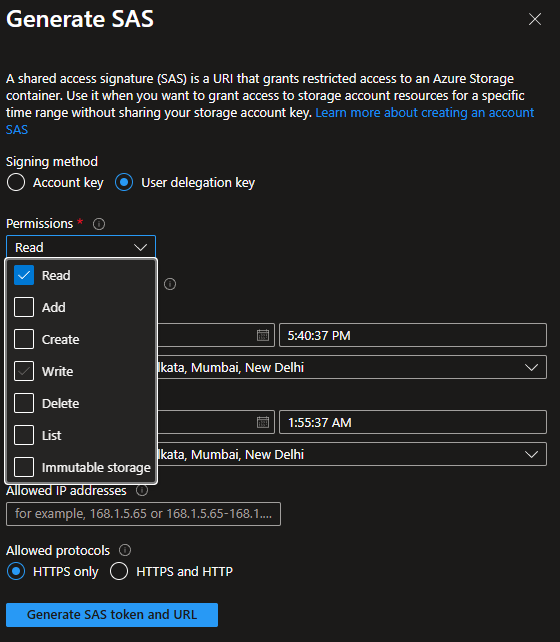
User Delegation SAS tokens are created with user delegation keys, which can be revoked to invalidate the tokens. You can revoke the user delegation keys by using the Revoke User Delegation Key API or the az storage account revoke-delegation-keys command in the Azure CLI. This will disable all the User Delegation SAS tokens for the storage account that you specify.
az storage account revoke-delegation-keys --name <storage-account> --resource-group <resource-group>
- Stored Access Policies: When generating a Service SAS, instead of embedding all permissions and expiry directly in the SAS token, you can associate the SAS token with a Stored Access Policy defined on the container (or file share).
A stored access policy lets you define:
- Permissions (read/write/delete/list, etc.)
- Start time
- Expiry time
Then the SAS token only references the policy using an identifier, making the token easier to govern.
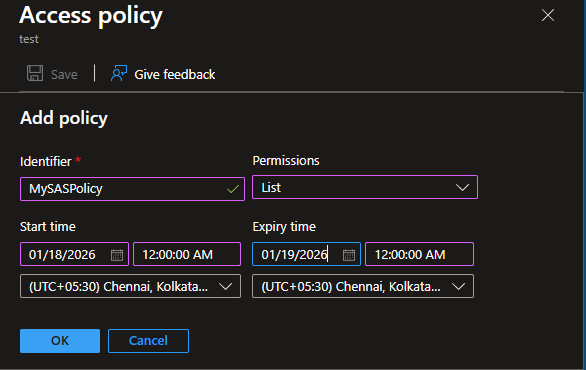
Why Stored Access Policies Matter
Stored access policies provide better operational control because you can:
- Revoke a SAS token by deleting or modifying the stored access policy
- Extend or reduce expiry without regenerating all SAS tokens
- Centralize access rules for multiple SAS tokens tied to the same policy
This is useful when SAS tokens are shared across applications or external consumers and you want a clean mechanism to disable access quickly.
- Access Key Based SAS Tokens: Access key-based SAS tokens are not recommended. However, if you have to use them, then remember these things. To use them safely, you should follow these best practices: restrict the permissions, specify the expiry times, and use HTTPS protocol. You should also have a revocation plan, as you will have to change the access keys to cancel the tokens.
Network
Even with strong authorization (RBAC / Managed Identity), network-level restrictions add an additional security boundary by controlling where storage can be accessed from. This reduces the risk of exposure if credentials or SAS tokens are ever leaked.
1) Storage Firewall
The Azure Storage Firewall enables you to define network rules that allow access only from approved IP address ranges or specific virtual networks.
- Subnets: Allow access to storage by specifying subnets through service endpoints.
- Public IP Addresses: Add public IP addresses to the firewall to grant access.
- Trusted Azure Services: Configure the firewall to allow trusted Azure services.
- Resource Types: Specify which resource types can access the storage.
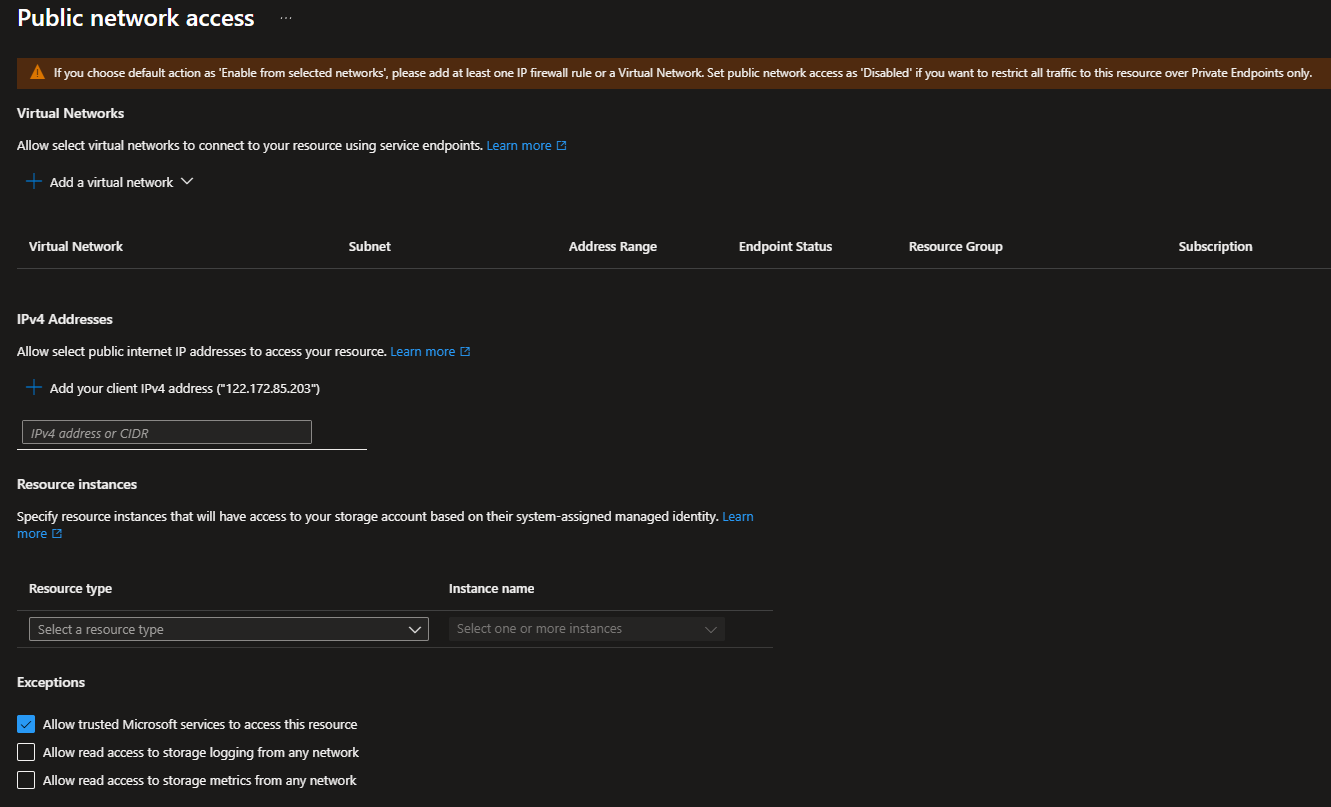
Firewall rules are useful when you want controlled access but still keep the storage account reachable through public endpoints.
2) Private Endpoint
Azure Private Endpoint enables access to Azure Blob Storage using a private IP address inside your VNet, ensuring traffic stays within the Azure backbone network.
With Private Endpoint:
- The storage account is accessible privately from selected VNets
- Data transfer remains off the public internet
- You can combine this with DNS controls for private name resolution
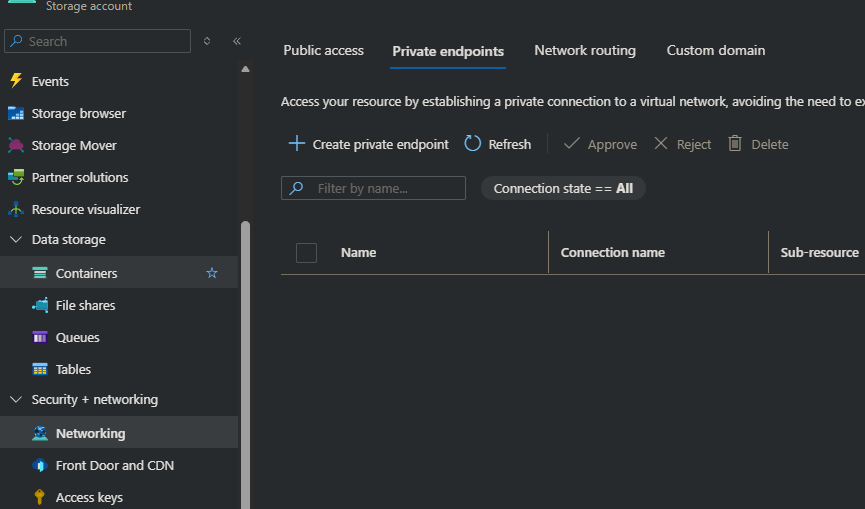
Private Endpoint is commonly used for enterprise environments where the requirement is to keep storage access private and reduce internet exposure.
Azure Storage also supports disabling public network access completely. When this is enabled, access through public endpoints is blocked and storage is reachable only through private connectivity (such as Private Endpoints).
This reduces the attack surface significantly by ensuring storage isn't accessible from external networks.
3) Network Security Perimeter (NSP)
Azure Network Security Perimeter (NSP) provides perimeter-based network governance for PaaS services, including Azure Storage.
NSP helps define a controlled network boundary around a group of Azure resources and enforce consistent inbound/outbound network expectations.
NSP is especially useful when:
- Multiple teams manage different workloads across subscriptions
- Resources are shared across environments
- You want centralized perimeter-level governance instead of resource-by-resource allowlists
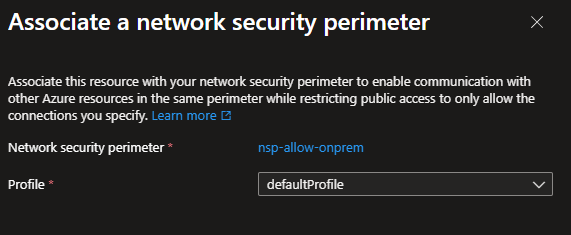
It strengthens network isolation controls beyond basic firewall configuration by enforcing access boundaries using perimeter rules such as:
- IP address-based access controls
- Service tag-based access controls
- Subscription-based boundaries (to govern which subscriptions/resources are allowed within the perimeter)
Configurations
Beyond authorization and network controls, Azure Storage provides configuration settings that help enforce additional security policies and reduce accidental exposure. These settings are typically applied at the storage account level (and in some cases at the container level).
1) Disallow Blob Anonymous Access
Blob anonymous access allows containers and blobs to be exposed anonymously to the internet (when configured). To reduce unintended exposure, you can configure the storage account to disallow anonymous access, ensuring all access is authenticated and authorized.

This setting is especially important in environments where public access should be blocked by default, even if someone accidentally enables container-level public access.
2) Disable Access Keys
Azure Storage account keys provide broad permissions across the storage account. To strengthen security posture and encourage identity-based access, you can disable shared key authorization and require modern authentication options such as Microsoft Entra ID.

Disabling shared key access helps avoid risk associated with:
- Accidental exposure of keys in code/configuration
- Long-lived secrets shared across teams
- Lack of fine-grained auditing compared to identity-based access
3) Secure Transfer Required
Secure transfer ensures that data moving to and from Azure Storage is encrypted in transit. Enabling Secure Transfer Required blocks requests made over HTTP and enforces secure HTTPS connections.

4) TLS Version
Set the minimum TLS version to 1.2 on storage accounts to ensure secure connections, as Azure Storage currently supports TLS 1.2 on public HTTPS endpoints.

5) Enable Soft Delete and Versioning
While not strictly "access control", recovery configurations help protect against accidental deletion or malicious modifications.
Common settings include:
- Blob soft delete (recover deleted blobs within retention period)
- Container soft delete (recover deleted containers)
- Blob versioning (restore previous versions of blobs after overwrites)

These options are especially helpful for mitigating risks such as:
- Accidental deletes
- Unintended overwrites
- Ransomware-like scenarios
6) Immutable Storage (WORM / Compliance Retention)
For compliance scenarios, Azure Blob Storage supports immutability policies that can enforce Write Once, Read Many (WORM) behaviors.

With immutability controls, data can be protected from modification or deletion for a defined retention period, supporting regulatory requirements and auditability.
Important: Once you lock a time-based retention policy, you can't delete it. You can extend the retention period, but you can't decrease it.
Encryption
Encryption protects your data at rest, meaning even if someone gains access to the underlying storage media, the content remains unreadable without the required keys.
Azure Blob Storage supports encryption by default using Service-Side Encryption (SSE).
Azure Storage automatically encrypts data before writing it to storage and decrypts it when accessed. This happens transparently for the application.
SSE applies to:
- Block blobs
- Append blobs
- Page blobs
- Snapshots
- Blob metadata
1) Microsoft-Managed Keys (MMK)
With Microsoft-managed keys, Azure handles encryption key management automatically. This is the default configuration for most storage accounts.
2) Customer-Managed Keys (CMK)
With customer-managed keys, you maintain control of the key lifecycle using Azure Key Vault (or Managed HSM). This can support scenarios where organizations require control over key governance, access, rotation, and auditing.

3) Customer-Provided Keys (CPK)
Customer-Provided Keys allow you to provide an encryption key on each request to Blob Storage. Azure does not store the key; the client supplies it during read/write operations.
CPK introduces additional operational considerations since clients must consistently supply the correct key during all eligible operations, and loss of the key can make data inaccessible.
// Create CustomerProvidedKey from raw bytes
var cpk = new CustomerProvidedKey(keyBytes);

// Attach CPK to client options
var blobClientOptions = new BlobClientOptions
{
    CustomerProvidedKey = cpk
};
var serviceClient = new BlobServiceClient(connectionString, blobClientOptions);
var containerClient = serviceClient.GetBlobContainerClient(containerName);

var blobClient = containerClient.GetBlobClient(blobName);

// Upload file using CPK
using var stream = File.OpenRead(filePath);

// Upload the file
blobClient.Upload(stream, overwrite: true);

// Download the file
blobClient.DownloadTo(downloadPath);
Important: The same CPK must be provided for both upload and download operations. If the key is lost, the blob data becomes inaccessible.
4) Encryption Scopes
Encryption scopes provide more granular encryption control within a single storage account. They allow you to associate different keys with different containers or blobs, supporting segmentation across applications, tenants, or datasets.

Encryption scopes can be used to enforce that certain containers/blobs always use a specific encryption configuration rather than relying only on the account-level default behavior.

Encryption Options Matrix (MMK vs CMK vs CPK vs Encryption Scopes)
| Capability / Feature | Microsoft-managed keys (MMK) | Customer-managed keys (CMK) | Customer-provided keys (CPK) | Encryption scopes |
|---|---|---|---|---|
| Key ownership | Microsoft | Customer | Customer (per request) | Microsoft or Customer (depends on scope key config) |
| Key storage | Microsoft-managed | Azure Key Vault / Managed HSM | External to Azure Storage (client-supplied) | Defined per scope (can reference CMK) |
| Key supplied per request | No | No | Yes | No |
| Granularity | Storage account level | Storage account level | Request level | Container / Blob level |
| Suitable for multi-tenant separation | Limited | Limited | Possible, but complex | Strong |
| Operational complexity | Low | Medium | High | Medium |
| Key rotation control | Microsoft-controlled | Customer-controlled via Key Vault | Customer-controlled (external) | Depends on key used by scope |
| If key is lost / revoked | N/A | Data access may be impacted | Data becomes inaccessible | Depends on key used by scope |
By implementing these security measures, you can ensure that your Azure Blob Storage account is well-protected against both internal and external threats. Remember, securing your data is a continuous process that requires regular review and updates to your security practices.
